Stop writing. Speak your notes.
AI writes and structures them instantly.
Record visits, meetings, and calls. AI transforms your recordings into professional, compliant case notes — saving you 30+ minutes per visit.
Download on the App Store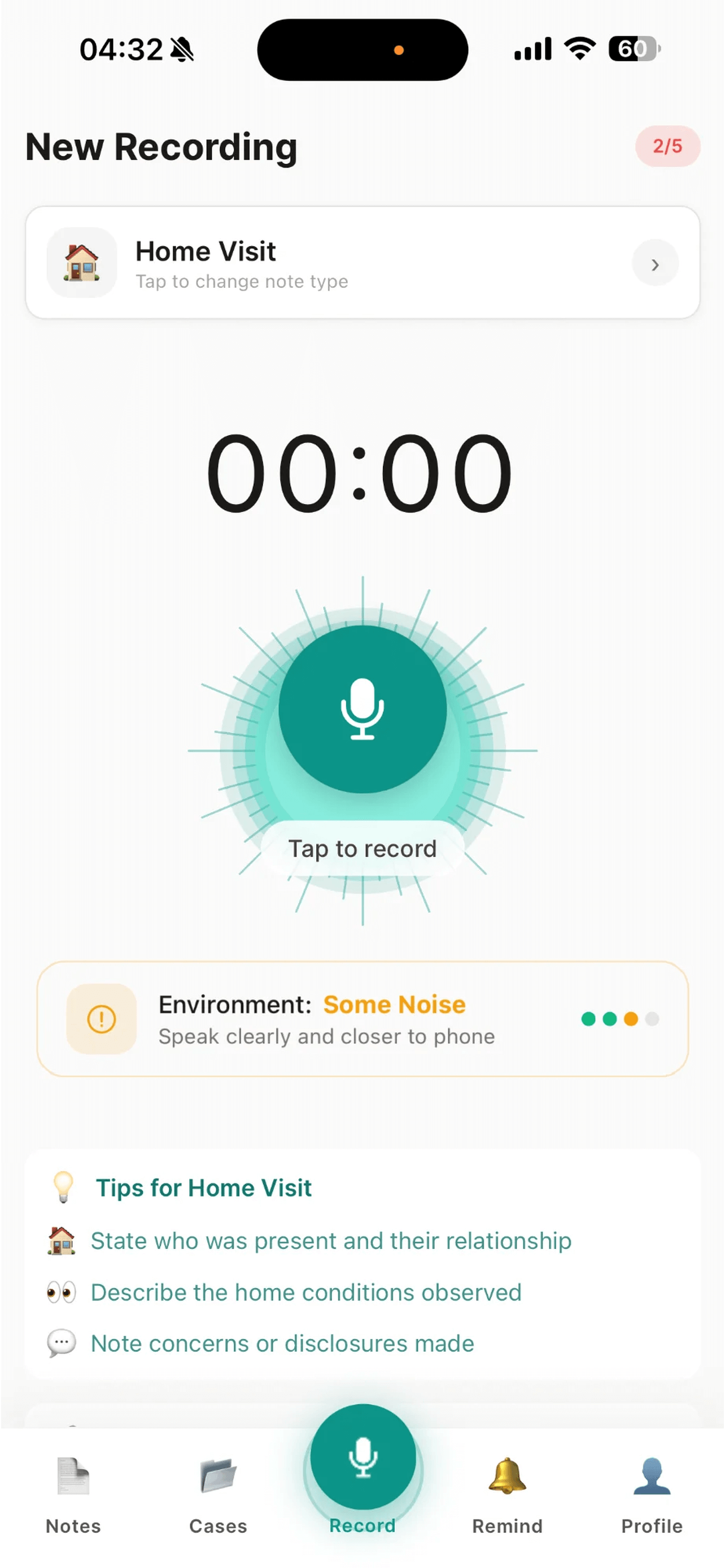
Loved by Social Workers
See what professionals are saying about SpeakCase
"SpeakCase has transformed how I document home visits. What used to take 45 minutes now takes 5. I can actually focus on the families instead of worrying about my notes."
"The AI structuring is incredible. It picks up all the key details and formats them exactly how my LA expects. Court chronologies that used to take hours now take minutes."
"Finally an app that understands UK social work. The safeguarding flags and Care Act categories are exactly what we need. Brilliant for our LAC reviews."
Built for UK Social Workers
Professional tools designed for your workflow
Voice Recording
Record during home visits, supervisions, or phone calls. Add bookmarks to mark important moments.
AI-Powered Notes
Recordings are automatically transcribed and structured into professional case notes.
Case Management
Organise notes by case. Track children's services, adult services, mental health, and more.
Safeguarding Flags
Flag notes with Care Act 2014 safeguarding categories. Track concerns and risk assessments.
Chronology Builder
Automatically build case chronologies from your notes. Filter by visit type and alerts.
Smart Reminders
AI extracts action items and deadlines from your recordings. Never miss a follow-up.
Compliance Checker
Built-in checks for UK recording standards: fact vs opinion, client voice, timeliness.
Secure & Private
Face ID and PIN protection. All data encrypted. GDPR compliant with full data controls.
Export Options
Export notes as PDF, Word, or plain text. Include audio recordings. Court-ready formatting.
SpeakCase Pro
Unlock the full power of AI-assisted case recording
20-Minute Recordings
Extended recording time for long meetings and supervisions
Unlimited Notes
No limits on how many notes you can create
AI Insights
Auto-generated summaries, risk flags, and suggested actions
Court Bundle Export
Format chronologies for court proceedings
Professional Standards Checker
AI flags note quality issues before submission
Case Handover Generator
AI generates comprehensive case handover documents
Email Draft from Note
Convert notes into stakeholder emails with one tap
Offline Sync
Work offline and sync when back online
Bulk Export
Export multiple notes as PDF or ZIP with audio
Voice Commands
Control recording with voice: "link to case", "add reminder"
Unlimited Cases
Manage your full caseload with no limits
Frequently Asked Questions
Everything you need to know about SpeakCase
Is SpeakCase GDPR compliant?
Yes, absolutely. SpeakCase is fully GDPR compliant. All data is encrypted with 256-bit encryption, stored on secure UK/EU servers, and you have full control over your data including the right to delete at any time.
Who can access my notes?
Only you. We cannot access your content. Notes are encrypted end-to-end and stored securely on your device and our UK servers.
Is SpeakCase approved by my local authority?
SpeakCase meets all data protection requirements for UK local authorities. Many social workers use it as a personal productivity tool. Check with your IT department if you need formal approval.
Is it safe to record service users?
SpeakCase is designed for recording your own verbal notes and observations, not conversations with service users. Always follow your local authority's recording policies.
What happens to my audio recordings?
Your recordings are processed securely to generate transcriptions. You can choose to keep audio files attached to notes or have them automatically deleted after transcription for extra privacy.
How long can I record?
Free trial users can record up to 3 minutes per session. With SpeakCase Pro, you can record up to 20 minutes - perfect for home visits, supervisions, and longer meetings.
Can I use it offline?
Yes, SpeakCase Pro includes offline recording. Record anywhere, even without internet connection, and your recordings will sync and transcribe when you're back online.
What note templates are included?
11+ UK social work templates including Home Visit, Core Group, CP Conference, LAC Review, Supervision, Strategy Meeting, S47 Enquiry, and more. Plus create your own custom templates.
How accurate is the transcription?
Typically 95%+ accurate. The AI is trained on UK English and social work terminology. You can easily edit any transcription before exporting.
Can I edit notes after transcription?
Yes, fully. Edit text, add sections, flag concerns, and refine before copying to your case management system.
Does it work with my case management system?
Yes! SpeakCase is designed to integrate seamlessly with UK case management systems including CareFirst, Mosaic, LCS, and Eclipse. Simply copy your structured notes with one tap.
What's included in the free trial?
5 notes, 3-minute recordings, all templates, and PDF export. Pro features like AI Insights, offline mode, and 20-minute recordings are available to try for 7 days.
How much does SpeakCase Pro cost?
SpeakCase Pro is £9.99/month or £99.99/year (save 17%). Start with a free 7-day trial to experience all Pro features before subscribing.
Can I cancel anytime?
Yes, cancel anytime with no penalties. Your existing notes remain accessible.
Is there a team or local authority licence?
Coming soon. Contact us at hello@speakcase.app for bulk licensing enquiries.
Why is my transcription taking long?
Transcription usually takes 1-2 minutes. Longer recordings or poor audio quality may take slightly longer. Ensure you have a stable internet connection.